> For the complete documentation index, see [llms.txt](https://docs.contextual.io/documentation-and-resources/llms.txt). Markdown versions of documentation pages are available by appending `.md` to page URLs; this page is available as [Markdown](https://docs.contextual.io/documentation-and-resources/components-and-data/agents/scale-and-performance/parallel-instances.md).
# Parallel Instances
On paid service plans, you can configure Agents to scale to multiple instances. Scaling can happen in two ways.
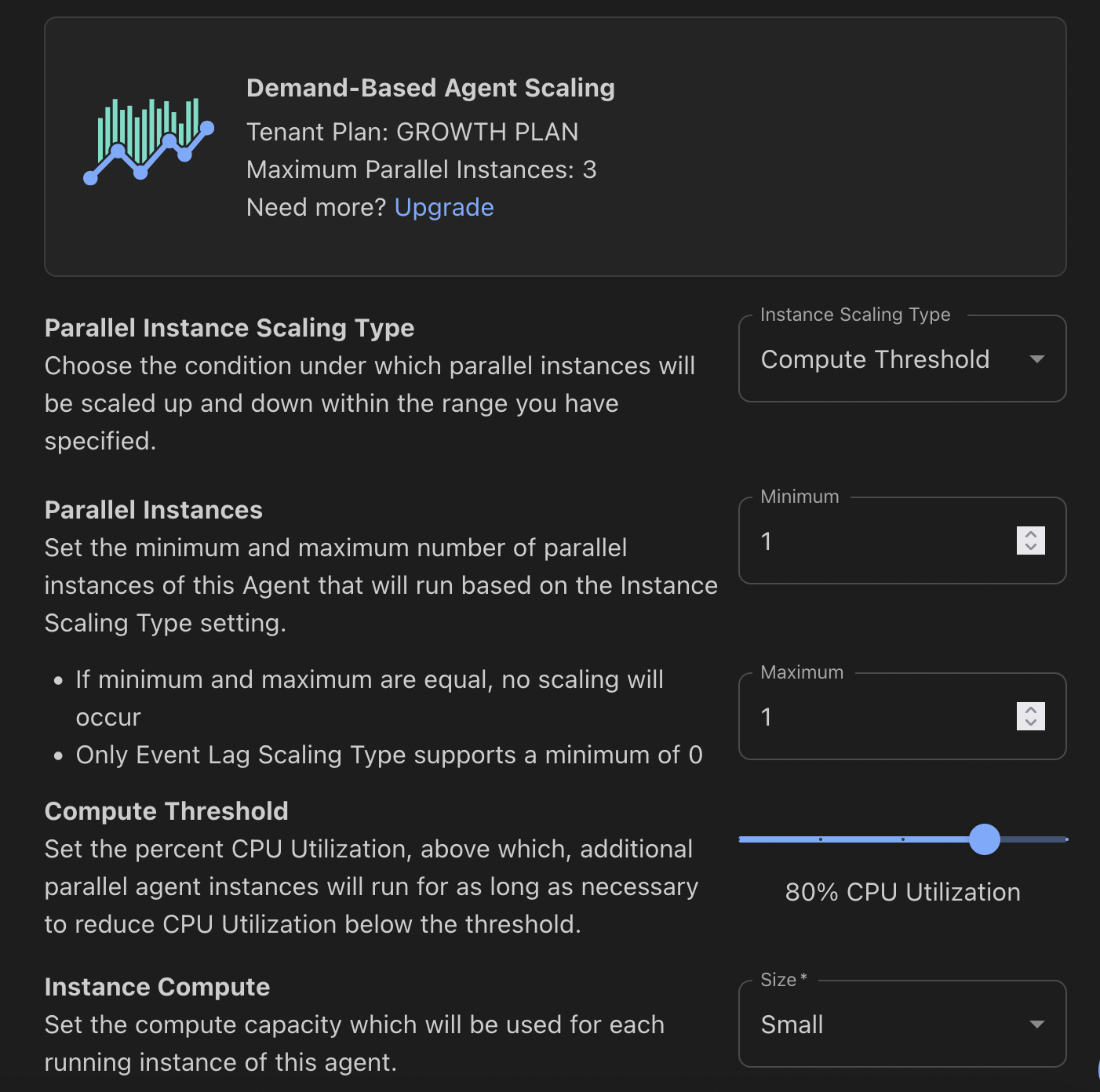
For HTTP and Event Agents, you can scale based on Compute. If compute hits a given threshold (e.g. - 80%), Contextual will automatically scale up another Agent instance.
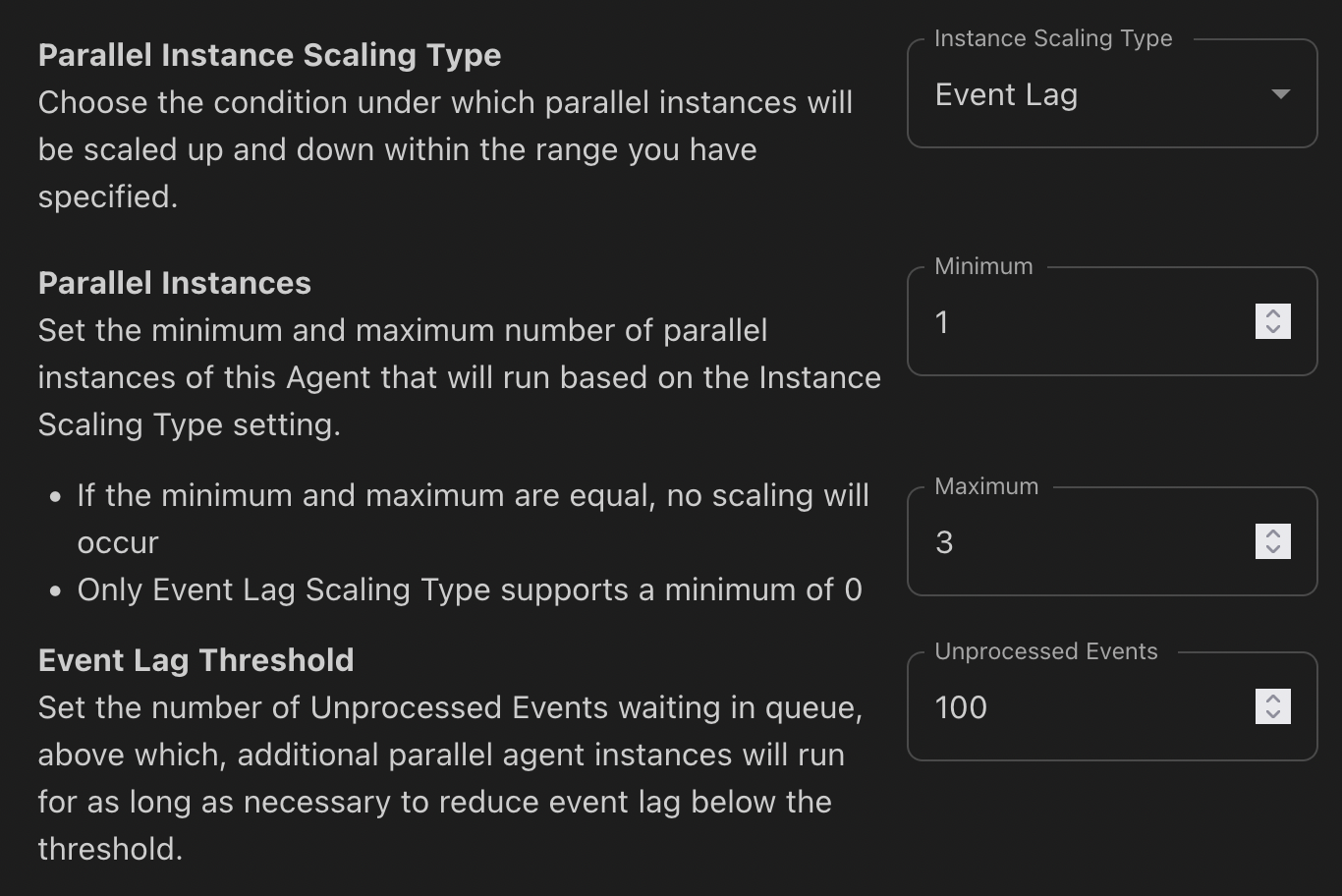
For Event Agents, you can also scale based on message lag. Based on the number of messages a given agent is required to process it can dynamically scale up to handle the increased message volume.
Compute-Based Agent Scaling
Message Lag-Based Agent Scaling
## Availability During Maintenance
For HTTP to Flow agents that need to keep serving requests during planned infrastructure maintenance, set **Minimum Instances** to 2 or more. See [Keep the Agent Available During Maintenance](/documentation-and-resources/components-and-data/agents/types-of-agents/http-to-flow.md#keep-the-agent-available-during-maintenance) for setup steps and the limits of this protection.
## Scale to Zero
On tenant plans that support parallel instance scaling, Event to Flow agents using Event Lag (lag-based) scaling can be configured to scale to zero running instances when the agent has no work to process.
To configure an Agent to scale to zero, set **Minimum Instances** to 0 and **Maximum Instances** to at least 1. When the agent has no work to process, the platform reduces running instances of that Agent to zero. When new events arrive, the platform starts an instance of the agent and begins processing again. Startup time is not a fixed duration and varies depending on agent size, image, and current load.
An agent configured to scale to zero may also run briefly at intervals when no new events have arrived.
A scale to zero configuration is appropriate for intermittent or bursty workloads that can tolerate startup latency. If minimizing processing latency is more important than reducing idle instance time, keep **Minimum Instances** set to at least 1.
{% hint style="warning" %}
**Not available for:** Compute Threshold (CPU-Based) scaling or HTTP to Flow agents. These always require **Minimum Instances** of at least 1. Cron to Flow agents run on a defined schedule and are not affected by these settings.
{% endhint %}
---
# Agent Instructions
This documentation is published with GitBook. GitBook is the documentation platform designed so that both humans and AI agents can read, navigate, and reason over technical content effectively. Learn more at gitbook.com.
## Querying This Documentation
If you need additional information that is not directly available in this page, you can query the documentation by asking a question.
Perform an HTTP GET request on the following URL with the `ask` and `goal` query parameters:
```
GET https://docs.contextual.io/documentation-and-resources/components-and-data/agents/scale-and-performance/parallel-instances.md?ask=&goal=
```
`ask` is the immediate question: it should be specific, self-contained, and written in natural language.
`goal` is what the user is ultimately trying to achieve, the reason they need the answer. Sharing it helps GitBook give you a better, more relevant answer. A goal is most helpful when it describes the outcome the user wants rather than restating the question. For example, with `ask=how do I create an API token`, a goal like `automate deployments from our CI pipeline` lets GitBook tailor the answer to that use case.
The response will contain a direct answer to the question and relevant excerpts and sources from the documentation.
Use this mechanism when the answer is not explicitly present in the current page, you need clarification or additional context, or you want to retrieve related documentation sections.